Config
The config directory is $AI9S_CONFIG_DIR, or $XDG_CONFIG_HOME/ai9s, or ~/.config/ai9s. The first ai9s or ai9s info creates config.yaml, skins/stock.yaml, and plugins.yaml when they are missing, and does not overwrite them later. ai9s info prints the paths.
ai9s:
  refreshRate: 0
  readOnly: false
  defaultView: sessions
  noExitOnCtrlC: false
  ui:
    enableMouse: true
    headless: false
    logoless: false
    noIcons: false
    skin: ""
limit: 400| Key | Meaning |
|---|---|
refreshRate | Seconds between reindexes. 0 reindexes only when you press r. |
readOnly | When true, Ctrl-D does not delete. d still opens describe. |
defaultView | sessions, providers, directories, branches, or models. |
noExitOnCtrlC | When true, Ctrl-C does not quit. |
ui.enableMouse | The mouse is on unless this is false. |
ui.headless | Hide the menu, the crumbs, and the logo. |
ui.logoless | Hide the logo beside the menu. |
ui.noIcons | Hide the two-letter mark on describe and in stats. |
ui.skin | A file in skins/, without .yaml. Empty uses the built-in skin. AI9S_SKIN overrides this. |
ui.limit | Maximum rows in the table. The ceiling is 2000. The default is 400. |
Skins
A skin file uses the same shape as the stock skin: body, frame, and table colors. Values are tcell names such as white, or #RRGGBB. The name default keeps the terminal color. agents maps an agent id to a color and overrides the built-in mark.
With ui.skin empty, the screen is true black (#000000) with the k9s accent colors: blue text, an orange logo, a blue border, fuchsia view keys, and an aqua selection bar. The crumbs line stays black. The named stock skin is the older white-on-black palette. A skin file replaces any field it sets, and the rest stay on the built-in palette. The shortcut bar is a grid: view keys on the first row, actions beneath them, and a further row for each group of plugin keys you have installed.
Plugins
A plugin runs a program. It does not get a shell. Put the list in plugins.yaml, or one plugin in each file under plugins/. background: true starts it without leaving the UI and discards its output. Otherwise ai9s suspends the screen, the way resume does.
plugins:
  edit:
    shortCut: Ctrl-E
    description: open the directory
    scopes: [sessions]
    command: code
    args:
      - $CWD
The selected row provides $ID, $NATIVE_ID, $AGENT, $CWD, $TITLE, $BRANCH, $MODEL, $FILTER, and $NAME. Scopes are sessions, providers, directories, branches, models, or all. An empty scope list means every view. A command with no slash is looked up on PATH, then in the config plugins/ directory, so a script can sit beside its yaml file.
Example plugins
The repo ships four plugins under examples/plugins. They stay off until you copy the script and the yaml file into plugins/ and restart. The new keys are drawn on the menu. Each environment value is one program name, not a shell line.
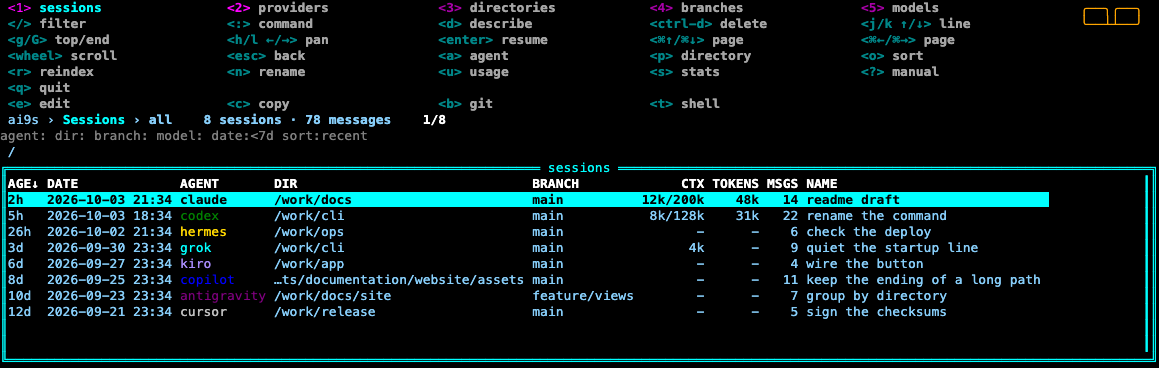
e edit, c copy, b git, t shell.| Key | Plugin | Action | Configure |
|---|---|---|---|
e | open-editor | Open $CWD. A terminal editor uses this screen. A GUI editor returns to the list. | AI9S_EDITOR |
c | copy-session | Copy the arguments to the clipboard. Several arguments are separated by tabs. | the args list |
b | git-story | Show git status and recent commits, then wait for enter. | AI9S_GIT_LOG, default 20 |
t | new-terminal | Open a terminal in $CWD without resuming the agent. | AI9S_TERMINAL. Empty uses Terminal.app on macOS. |
These shortcuts are reserved and ignored: q, /, :, d, r, s, n, u, ?, a, p, o, j, k, h, l, g, G, 1–5, Enter, Tab, Esc, and Ctrl-D. A repeated shortcut is ignored too. ai9s prints the reason on startup and in the header.
Do not put tokens or other secrets in these files. A new config.yaml is mode 0600.